Cosmic Cataclysms
Tutorial
TUTORIAL TO BECOME A NIGHT WATCHER
First time observing a cosmic cataclysm? Read this page to master your Unistellar telescope and join our team of Night Watchers.
PRE-OBSERVATION
1 – Select Your Mission
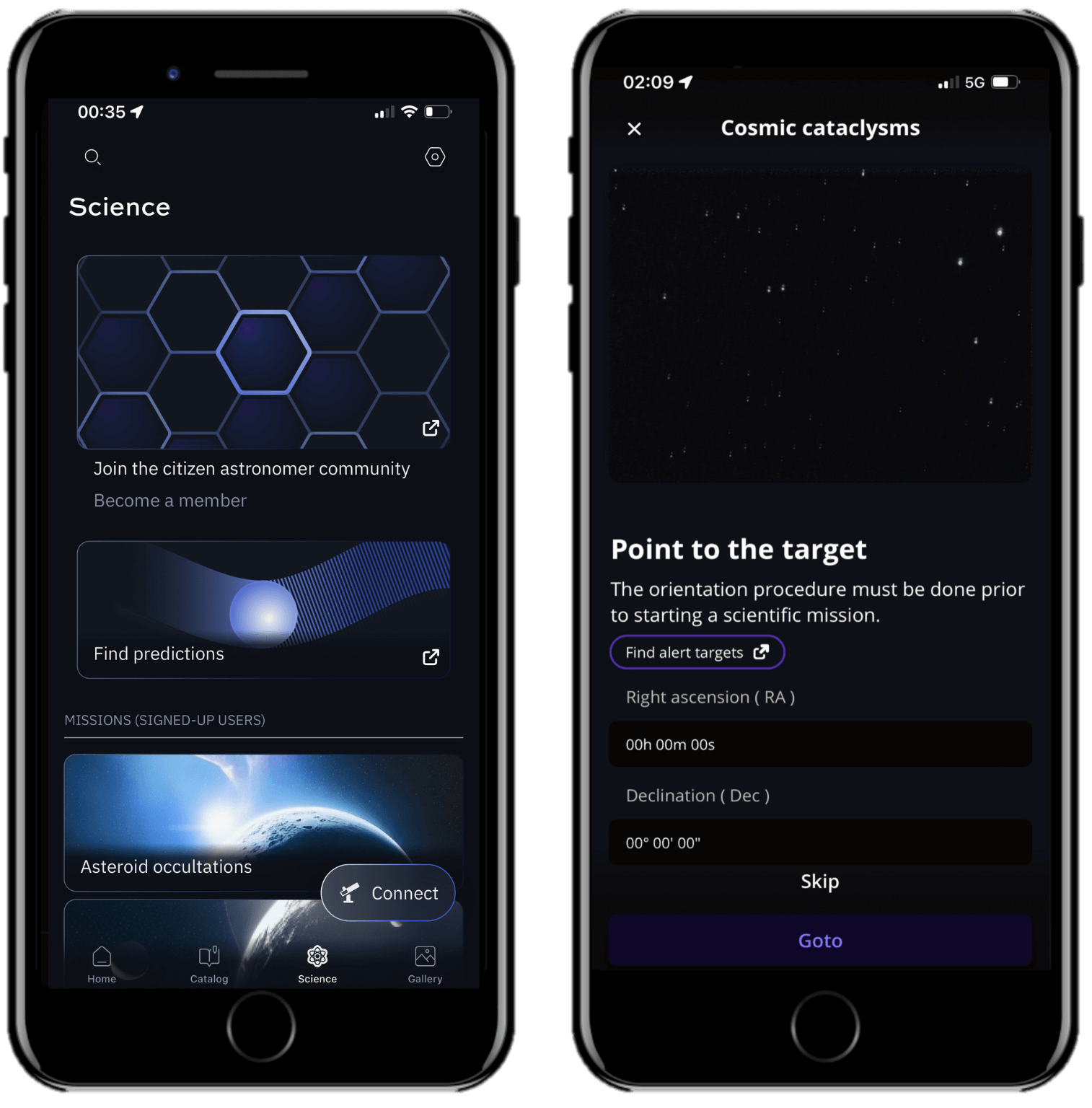
To get started, you have to select a mission suitable for your location. Go to our Missions page or access the Cosmic Cataclysms Alerts page directly and select an event you want to observe. Or, from the Unistellar App you can select “Cosmic cataclysms” from the Science menu and click on “Find alert targets”. The Alerts page is updated immediately when we receive notifications of new explosive events from professional telescope facilities. You can observe an event for as long as it remains in the Alerts table, and you can observe it at any point in the night when the target is visible to you! Your ability to observe a specific target may depend on which hemisphere you are observing from.
2 – Read Your Mission Details
Once you have selected a scientific mission based on your location, you need to access the observation details, including the coordinates of the star and the recording parameters of the telescope. You will need them to observe the explosion.
To easily load all of that information into the Unistellar App with a Deep Link, click the smartphone icon in the “Link” column of the Alerts page to automatically open the Cosmic Cataclysms screen of the App.
For one of the example events shown here, the information in the table is:
- Target Name: ZTF22abyelas
- Target Right Ascension (Ra): 02h 07m 19s
- Target Declination (Dec): -25° 26 26’’
- Recording parameters: Exposure time (Exp.) = 3970 ms, Cadence (Cad.) = 3970 ms, and Gain = 30 dB
- Recording Duration: 1200 seconds (00h 20m 00s)
The other columns give you details about the type of explosion (Class), UTC date it was discovered (Discovered) and its brightness (V mag). Note that Finder images are not currently provided.

OBSERVATION
3 – 10 Minutes Before Your Mission
Once your Unistellar telescope is set to observe the night sky, you can use the Cosmic Cataclysms scientific mode of the Unistellar App. You can observe the explosion at any point of the night when the target is visible to you.
It is time to point to your target. Two options:
A. Deep Link method: The quickest way to find your target is to use your smartphone to click on the Deep Link associated with your event. It will automatically open the Cosmic Cataclysms tab of your Unistellar App and fill in the coordinates of the target and its recording parameters. When the Right Ascension and Declination boxes are filled with the correct coordinates, click on Goto to point to your target. Once the Goto is done, if the Record duration, Exposure time, Cadence, and Gain are correct, click on Save.
B. Manual method: Open your Unistellar App, click on the Science menu and select the Cosmic Cataclysms tab. Enter the Right Ascension and Declination and click on Goto to point to your target. Once the Goto is done, enter the Record duration, Exposure time, Cadence, and Gain and click on Save.

4 – Launch Observation
When you are ready, click on the Record button to start the observation. You can observe the explosion at any point of the night when the target is visible to you. During the observation, you may not be able to see the target on your screen because it may be quite dim.
5 – Complete Observation
Once the recording is over, click on Continue to calibrate your sensor. This calibration step gathers Dark Frames, which will help us better analyze your observation. You must put the dust cap on your telescope before recording the calibration.
After this step, a final message appears: “Recording complete”. The mission is over.
POST-OBSERVATION
5 – Share your data
Once you are at home, please upload your data to our server. Our team of scientists will analyze your observation to check if you detected the cosmic cataclysm. If you need help, please read these guidelines on “how to upload my data”.
6 – Tell Unistellar you participated
To make sure your contribution is properly processed and you are credited for the result, always fill out this Cosmic Cataclysm Observation Report. It asks for your name, the serial number of your telescope, the name of the scientific mission you just accomplished, and a few other helpful pieces of information.
We will send you the result of your scientific mission through our Slack communication platform within 24 hours.
Great Work, Citizen Astronomer.